

In simple terms, Core Web Vitals are a handful of specific metrics Google uses to evaluate the real-world user experience of your website. Think of them as a report card for how a potential client actually feels when they land on your site. A great score helps your SEO, but a poor one can send qualified leads running to your competitors.
As an MSP owner, it’s tempting to brush off Core Web Vitals as another piece of technical jargon from the marketing department. That's a huge mistake. These aren't just abstract numbers: they directly reflect how a potential client perceives your digital storefront. A slow, janky website is the online equivalent of a messy office lobby, a frustrating experience before they even see what you offer.
This isn't about shaving a few milliseconds off your load time for bragging rights. Google has made it clear that user experience is a top priority, and these metrics are a critical factor in how they rank websites. The three Core Web Vitals are confirmed ranking signals, which means they have a direct say in how high your MSP shows up when a local business is searching for a new IT partner.
The link between website performance and actual business outcomes is direct and undeniable. When your site delivers a smooth, fast experience, visitors stick around longer, check out more pages, and are far more likely to fill out your contact form. This is where your marketing investment truly pays off. A responsive website keeps potential clients engaged long enough for your value proposition to sink in.
Look at the real-world impact. One major publication focused on improving its Core Web Vitals and saw an 80% improvement in loading performance and a 43% drop in its bounce rate. For an MSP, a 43% reduction in bounce rate means keeping nearly twice as many prospects on your website, massively increasing your chances of turning them into paying clients. You can learn more about how performance boosts business results from this in-depth analysis.
A poor Core Web Vitals score is like paying for a billboard on a busy highway that's blurry and hard to read. You're getting the traffic, but no one can understand the message, and your investment is wasted.
Optimizing these vitals is about protecting your marketing budget. Every dollar you put into Google Ads or content is meant to drive people to your website. If that site fails to perform, you're essentially burning money the second a frustrated user hits the back button.
For any MSP looking to grow, this is why it matters:
To really get a handle on Core Web Vitals, let's ditch the jargon and use some real-world analogies. Think of your MSP website as your digital office. The experience a visitor has when they first "walk in" dictates whether they'll stick around to learn about your services or turn around and leave.
This isn't just about looking good. It's about a direct path from a smooth user experience to better search rankings and, ultimately, more qualified leads for your business.
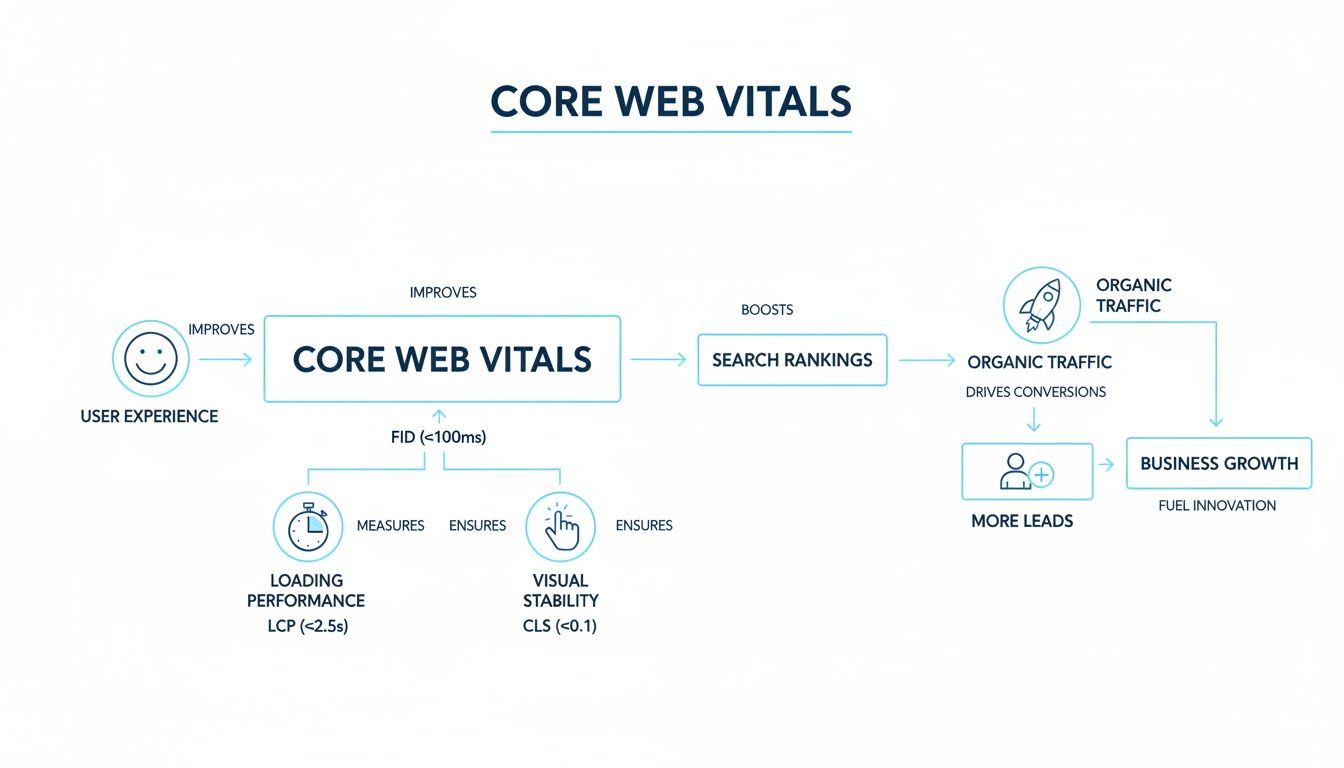
As you can see, improving how your site feels to a user is a direct investment in your lead generation pipeline.
Largest Contentful Paint (LCP) measures how long it takes for the most important visual element on your page to load. This is usually your main banner image, a featured video, or the primary headline that grabs a visitor's attention.
Imagine a potential client lands on your "Managed Cybersecurity Services" page. LCP is the time it takes for that bold headline and hero image to fully appear. If they're staring at a blank white screen for a few seconds, that’s a terrible first impression. It feels broken and casts doubt on your technical skills.
A good LCP score is under 2.5 seconds. Anything over 4 seconds is poor and is a huge reason why potential leads hit the back button before you’ve had a chance to make your case. For an MSP, LCP is your digital handshake. A fast, solid LCP tells a visitor you're professional and competent.
Interaction to Next Paint (INP) tracks how quickly your site reacts when a user does something. We're talking about clicks, taps, or selections, like clicking a "Learn More" button, expanding an accordion menu to read an FAQ, or choosing an option from a contact form dropdown.
Think about the "Request a Quote" button on your site. When a hot lead clicks it, INP measures the delay before something visually changes, like the form appearing. Any noticeable lag makes the site feel clunky and unresponsive.
Google's threshold for a good INP score is under 200 milliseconds, which feels almost instantaneous to a user. If a prospect has to wait, they might click again in frustration, assume the site is broken, and abandon the form completely. That's a lost lead, plain and simple.
Cumulative Layout Shift (CLS) measures the visual stability of your page while it's loading. It puts a number on how much your page elements unexpectedly jump around.
We’ve all experienced this. A visitor is about to click on your "Cloud Solutions" service link, but just as their mouse moves to click, a slow-loading image pops into place above it, pushing the entire layout down. Now, they've accidentally clicked on "Data Backup."
This is more than a minor annoyance: it's a frustrating experience that erodes trust and makes your website feel amateurish. To avoid this, you want a CLS score of 0.1 or less. A higher score means your layout is unstable, which directly contributes to higher bounce rates and missed opportunities.
Failing your Core Web Vitals isn't just a technical blip on a report. It's a problem with a direct, measurable, and often painful impact on your MSP’s bottom line. Forget the scores and percentages for a minute. Let's talk about the real-world financial damage a slow or clunky website causes. This isn't just about SEO, it's about staying in business.
Think of your website as your top salesperson. If that salesperson showed up late, fumbled their words, and made a terrible first impression, you would fire them on the spot. A poorly performing website is doing the same thing: actively wasting your marketing budget by slamming the digital door in the face of potential leads.
Every dollar you pour into Google Ads, LinkedIn campaigns, or content marketing is meant to do one thing: get qualified prospects to your website. But what happens when they get there and the page takes ages to load, or the buttons don't work? They leave. And they don't come back.
That click you just paid for is now a sunk cost with zero return. That prospect is gone, likely heading straight to a competitor whose site didn’t make them wait. This isn't a small leak. For many MSPs, it's a massive hemorrhage of their marketing funds.
Failing Core Web Vitals is like buying expensive, high-quality leads and then having your phone system hang up on them when they call. You are paying for the opportunity, but a technical failure prevents the conversation from ever happening.
Here's the good news. This widespread problem creates a huge opening for any MSP willing to take website performance seriously. Truth is, most of your competitors are dropping the ball. They treat their website like a static brochure instead of the powerful lead-generation engine it's supposed to be.
Their negligence is your opportunity. The data backs this up. One report that analyzed over 1,500 websites in a related industry found that a staggering 78.7% failed Core Web Vitals on mobile, desktop, or both. The analysis showed that for every $100 spent driving traffic, $30 is effectively wasted when that site fails these critical performance metrics. You can read the full report on how poor performance wastes ad spend.
When nearly four out of five competitors deliver a frustrating user experience, you have a clear path to gobbling up market share. By optimizing your Core Web Vitals, you're not just ticking a technical box. You are making a strategic business decision with a clear and predictable ROI.
Think about the direct business outcomes:
Fixing your website's performance isn't just another task for your developer. It’s a strategic imperative that directly impacts your lead flow, marketing ROI, and competitive standing. It's an investment in scalable, predictable growth for your MSP.

Knowing the theory behind Core Web Vitals is a great start, but the real power comes from seeing how your own MSP website measures up. This isn't just a technical exercise, it's about making smarter business decisions. Luckily, Google gives you all the tools you need, for free, to get a crystal-clear picture of your site's performance.
Let's break down the best tools for the job and what their reports actually mean. Armed with this data, you can have a much more productive conversation with your developer or marketing team about what needs to be fixed to improve your lead generation.
Before we jump into the tools, it's critical to understand the two different kinds of performance data you’ll be looking at: Lab and Field.
While lab data is perfect for debugging, field data is the source of truth for your Core Web Vitals scores.
The fastest way to get started is with Google PageSpeed Insights (PSI). Just pop in your website's URL, and it will run a full diagnostic for both mobile and desktop. The report gives you an overall performance score and then breaks down all the individual metrics, including the three Core Web Vitals.
What makes PSI so useful is that it shows you both lab and field data in one report. It will instantly tell you if your LCP, INP, and CLS scores are "Good," "Needs Improvement," or "Poor." Better yet, it provides a "Diagnostics" section with actionable recommendations, like "serve images in next-gen formats" or "reduce unused JavaScript."
For MSP owners, PageSpeed Insights is your quick diagnostic tool. A "Poor" score here is a clear signal that your website's performance is likely costing you leads and needs immediate attention.
While PSI is great for checking a single page, Google Search Console (GSC) gives you a big-picture view of your entire site's performance over time. If you haven't set up GSC for your website, consider this your call to action. It’s an essential tool for any serious SEO strategy.
Inside your GSC dashboard, you’ll find a "Core Web Vitals" report under the "Experience" section. This report is a game-changer because it groups all your site's URLs by performance status, showing you exactly which pages are passing and which ones are failing.
You can then drill down into the "Poor" or "Needs Improvement" URLs to find the root cause. For example, you might discover that all your blog posts have a high CLS score, pointing to a problem with your blog post template.
Unlike PSI, this report is based 100% on field data, giving you the most accurate look at what your users are actually experiencing. To go even deeper, you can learn more about how to conduct an SEO audit and get a complete picture of your site's health.

Knowing your Core Web Vitals scores is one thing, fixing them is another. Let's move from theory to action. Improving these metrics isn't just about appeasing Google, it's about removing the digital friction that costs you leads.
We're going to focus on practical, high-impact solutions that tackle the most common performance bottlenecks on MSP websites. This is a prioritized checklist to guide your development team or marketing partner.
Nine times out of ten, a poor LCP score on an MSP site comes back to one thing: large, unoptimized images. That impressive hero banner of a futuristic data center has to load instantly, not drag the page down with it.
The goal here is simple: shrink the file size of your largest visual element without making it look pixelated. When you get this right, your key message and branding appear almost immediately, giving visitors that crucial, positive first impression.
Here are the most effective fixes:
A slow, clunky website is a lead killer. When a potential client clicks your "Request a Consultation" button and nothing happens for a second, their confidence in your technical expertise plummets. That lag is almost always caused by heavy scripts running in the background.
The usual suspects are third-party code from marketing tools, chatbots, or analytics platforms. These scripts all compete for the browser's attention, delaying its ability to respond when a user clicks, taps, or types.
Think of it this way: a web browser can really only do one thing at a time. If it's busy processing a complex script for your chatbot, it can't simultaneously respond to a user trying to click a button. This is why being ruthless about your scripts is essential.
To sharpen your INP score, you need to lighten the load:
Ever tried to click a button on a website, only to have an ad load and push it down the page? That's CLS in action. It's frustrating, jarring, and makes your site feel unprofessional.
This annoying shifting is most often caused by elements loading without their dimensions being specified ahead of time. The browser doesn't know how much space to save for an image or a video, so when it finally arrives, it shoves all the other content out of the way.
Luckily, the solution is surprisingly straightforward:
width and height attributes in your <img> and <video> tags. This simple instruction tells the browser to save a spot of a specific size, preventing any layout shifts when the media loads.transform for Animations: If you have animations on your site, make sure they use the CSS transform property instead of animating properties like top or left. Transform animations don't affect the layout of other elements, so everything stays stable.Many of these fixes fall under the broader discipline of technical SEO, which is all about optimizing your site's infrastructure. To learn more, check out our complete guide on what is technical SEO.
So far, we've gone deep into what Core Web Vitals are, why they matter, and the technical fixes you can make. Now it's time to connect the dots and show how all this work translates directly into growing your MSP.
Think of these metrics as more than just a developer's to-do list. They are the bedrock of a website that doesn't just sit there: it actively generates business. For an MSP, your website needs to be your best salesperson, working 24/7. A fast, stable, and responsive site builds instant credibility and showcases your technical expertise before a prospect even reads a word about your services.
Improving your LCP, INP, and CLS scores has a tangible impact on the bottom line. It’s a straight line from a better user experience to more leads and, ultimately, more revenue.
When you nail your website's performance, you kickstart a powerful flywheel for all your marketing efforts.
Optimizing Core Web Vitals isn't just about speed. It’s about tearing down the digital friction that stands between a curious visitor and a qualified lead for your sales team.
By putting in the effort to improve your site's performance, you gain a massive competitive advantage over other MSPs whose websites are little more than online brochures. We've seen this strategy pay off time and again, as you can see in our MSP marketing case studies.
The first move is always to figure out where you stand. Run your website through a tool like Google PageSpeed Insights to get your baseline scores. This gives you a clear, objective starting point.
Once you have that report in hand, the path forward becomes much clearer. The next logical step is to build a strategy that turns those technical insights into tangible business results.
Ready to stop thinking of your website as a digital business card and start treating it like a consistent source of new clients? Schedule a consultation with our MSP marketing experts. We'll help you build a plan to make your website work as hard as you do.
As an MSP owner, you're probably wondering how all this fits into your day-to-day. Let's get right to the practical questions I hear most often and give you some straightforward answers.
This isn't something you need to obsess over daily. A solid routine is to run a full check at least once per quarter. That cadence is frequent enough to catch negative trends before they tank your search rankings but not so often that you're just spinning your wheels.
The big exception? Always check your vitals right after making a significant change to your site. This could be anything from a major redesign or adding a new tool like a live chat. Think of it as a quick health checkup after surgery.
Yes, without a doubt. A bloated, poorly coded WordPress theme is one of the most common reasons I see for bad Core Web Vitals scores. Many themes look great but come loaded with tons of extra features, clunky animations, and heavy scripts that kill your LCP and INP.
It's the same story with plugins. Each one adds more code for the browser to load and process, and it all adds up. Be ruthless. Choose a lightweight, performance-first theme and only install the plugins you absolutely need.
Hitting the "Good" threshold is the baseline, but you shouldn't stop there. Think of it as the starting line, not the finish line. When it comes to user experience, faster is always better.
A site that loads well within the "Good" range feels noticeably snappier to a potential client. That superior experience often translates directly into higher engagement, fewer people bouncing off your site, and more submissions on your "Request a Quote" form. Aim to be as fast as possible to create a real competitive advantage.
Ready to turn your website from a digital brochure into a powerful lead-generation engine? Schedule a consultation with us today to build a strategic plan that drives real growth for your MSP.
Core Web Vitals are not just a technical checkbox; they are a direct ranking signal that influences how Google evaluates your MSP website SEO. A site that excels in LCP, INP, and CLS demonstrates the kind of technical professionalism that IT decision-makers expect from a managed service provider. Incorporating Core Web Vitals optimization into your broader MSP SEO strategy ensures that every visitor who arrives through organic search, local SEO for MSP queries, or referral traffic encounters a site that loads instantly and performs flawlessly. The MSP SEO agencies that prioritize these metrics help their clients build a lasting technical advantage that compounds with every content update and backlink earned.
See how targeted SEO delivers measurable impact for managed service providers. Explore our proven strategies and real-world outcomes.