

Let's get real for a moment. Creating content for SEO is more than a technical checklist; it’s the core driver of your website's traffic and an audit helps to figure out which content is working and whcih content is not bringing in the clients you need. Think of it as a full diagnostic on your marketing engine. We’re going to pop the hood to see what’s working, what’s broken, and what’s actively preventing your MSP from landing high-value contracts.
This is the first, most crucial step in transforming your website from a pretty online brochure into a machine that consistently generates qualified leads.
You’ve got a slick, professional-looking website. You invested good money into it. So why is it sitting there collecting dust instead of leads? It's a frustratingly common story for MSP owners. Your site looks the part, but it's completely invisible to potential clients actively searching for the exact IT solutions you provide.

The problem is rarely the design itself. It's almost always what’s happening, or not happening, behind the scenes.
Simple but deadly issues are often the culprits. I’m talking about slow page speeds, confusing site navigation, or content that completely misses the mark on what your prospects are asking. A CFO searching for "cybersecurity services for small businesses" isn’t going to wait around for a slow page to load, nor will they sift through generic blog posts to find what they need. They’ll hit the back button and head straight to your competitor.
An SEO content audit is how we stop guessing and start fixing. It’s a systematic, data-backed approach that lays bare all the issues holding back your growth. This isn't just a technical task: it's a strategic business move that pinpoints exactly where you're leaving money on the table.
This process gives you clear answers to the questions that directly affect your bottom line:
In the hyper-competitive MSP space, you have to fight for every click. Consider this: an estimated 94% of all webpages get zero traffic from Google. A targeted content audit is your way to beat those odds.
I've seen it time and time again. MSPs who commit to regular audits find and fix seemingly small things that make a massive difference. We're talking about missing meta descriptions on key service pages or content that doesn't target the high-intent keywords people use when they're ready to buy. These aren't just minor tweaks; they're the fixes that open the floodgates for new leads. You can see a detailed statistical breakdown on SEOmator that shows just how powerful this process can be.
To make this clearer, let's break down the main components of a content audit and see how each one directly helps your MSP grow.
Each piece of the audit puzzle gives you a specific, actionable insight. By addressing these areas systematically, you're not just "doing SEO," you're building a reliable system for client acquisition.
Before you can fix your website's lead generation problems, you need to gather your tools and get a clear lay of the land. Think of it like a tech showing up for a network assessment; you wouldn't just walk in empty-handed. This is all about prepping your gear and creating a complete map of every single page on your site.

The great news is you don’t need a huge budget to do this right. Some of the most effective tools are free, and they provide all the essential data you need to kick off a successful SEO content audit. It's just a matter of knowing what to use and where to look.
As an MSP owner, your time is your most valuable asset. The good news is you can get 80% of the insights you need from just a few straightforward tools. We're going to focus on the essentials that give you the most impact without a massive learning curve.
Here are the absolute must-haves for your toolkit:
Key Takeaway: You don't need a dozen complicated, expensive tools to get started. Focus on mastering Google's free platforms and a simple crawler first. That combo alone will give you the critical data you need to make smart decisions about your content.
With your tools ready, the first real task is to build your content inventory. This is just a master spreadsheet that lists every single important URL on your website. It becomes the foundation of your entire audit, your command center for tracking, analyzing, and planning what comes next.
Don't get spooked by the idea of a spreadsheet. This is simply about getting organized. You can't improve what you don't measure, and this inventory makes your entire digital footprint visible.
The goal here is to pull all your URLs into one place and then layer on performance data from the tools we just discussed. This simple process turns a basic list of links into a powerful diagnostic report.
Fire up a new spreadsheet and create columns for the most important data points. The easiest way to get started is to run your site through a crawler and export the list of all your pages.
Here are the essential columns your inventory needs:
This inventory is your roadmap. Once you have this data organized, you're no longer guessing. You've got a clear, objective view of every single asset on your website, which sets the stage perfectly for the next step: checking its technical health.
You can have the most compelling, expertly-written content in the world, but if search engines can't find and understand it, it’s all for nothing. Technical SEO is the bedrock of your entire digital marketing effort. Get this part wrong, and you’re invisible to Google and the clients you’re trying to reach.
Think of it this way: having great content on a technically flawed site is like having the perfect sales pitch but a dead phone line. A technical health check makes sure those lines of communication with search engines are crystal clear.
This phase of your SEO content audit is less about the words on the page and more about the digital plumbing. We're digging into how easily search engine crawlers can navigate, interpret, and ultimately index your website.
Your first port of call should always be Google Search Console. Dive into the "Pages" report, where Google tells you exactly which pages it's struggling with. These aren't just suggestions; they are direct alerts from Google that something is broken.
Crawl errors are essentially dead ends for search engine bots. They're often caused by deleted pages that were never redirected (404 errors) or server glitches (5xx errors). Fixing these is priority number one because a page that can't be crawled can't be ranked. Period.
While you're at it, inspect your robots.txt file. This tiny text file holds immense power, telling search engines which parts of your site they should and shouldn't access. A single misplaced character can accidentally block your entire website from being indexed, effectively erasing you from search results overnight.
In 2024, site speed is non-negotiable. It's a cornerstone of good user experience and a confirmed ranking factor. Google’s Core Web Vitals are the three key metrics it uses to measure your site's real-world user experience.
Here’s what they mean in plain English:
Failing these vitals directly hurts your MSP's lead generation. Think about it: a slow, clunky website is actively bleeding potential clients. Shockingly, only 43% of websites pass all Core Web Vitals on mobile, where over 62% of organic searches now happen. Even a tiny 0.1-second delay in page speed can slash your conversion rate by 8.4%. That's a huge hit to your bottom line.
MSP Pro Tip: It's easy to get bogged down in the technical weeds here. Just remember this simple truth: a slow website costs you money. Use Google's PageSpeed Insights tool to get your scores and focus on implementing the specific recommendations it provides.
As you work through your technical audit, be on the lookout for these common culprits that can hamstring an MSP's online presence. Addressing them often results in a quick and satisfying performance boost. To see how this fits into a larger strategy, you might be interested in our deep dive into how to conduct an SEO audit for a more detailed process.
Here's a practical checklist of what to watch out for:
With your site’s technical house in order, it's time to roll up our sleeves and get into the content itself. This is where we move past the code and crawlers to look at what your potential clients are actually reading and experiencing on every single page.
This is the make-or-break part of an SEO content audit. After all, great content is what ultimately gets a prospect to trust you enough to pick up the phone. It’s not about keyword stuffing; it’s about proving you genuinely understand their IT headaches and have the right prescription.
Think of every page on your website as a dedicated employee with one specific job. Its main role? To rank for a specific keyword or topic that your ideal client is typing into Google. Your "Managed Cybersecurity Services" page, for instance, needs to be the most convincing and comprehensive answer for anyone searching that phrase.
Let's start by looking at your most important service pages. Pull one up and see if the main keyword is naturally integrated into these critical spots:
If these basic on-page elements aren't dialed in, you're essentially making Google guess what your page is about. It's a simple fix that often punches well above its weight in terms of results.
Modern SEO isn’t just about repeating a keyword over and over. It's about building topical authority. This means your content needs to cover a subject so comprehensively that it answers every related question a potential client could possibly have.
For example, a page on "disaster recovery solutions" shouldn't just offer a dictionary definition. It needs to dig deeper. Talk about things like RTO/RPO (Recovery Time Objective/Recovery Point Objective), different backup strategies, compliance considerations like HIPAA or CMMC, and maybe even a quick case study.
When Google sees your content as a complete, one-stop resource, it starts to view your entire site as an expert on that subject. This is how you start to outrank competitors who are still publishing thin, superficial pages.
The Big Picture: Put yourself in your prospect's shoes. If they're trying to solve a specific IT challenge, your website should have all the answers. A thorough content audit shines a light on all the places where you're currently dropping the ball and leaving the door wide open for competitors.
One of the most powerful outcomes of an on-page analysis is identifying content gaps. These are the valuable, high-intent keywords that your competitors are ranking for, but you've completely overlooked.
Fire up a tool like Semrush or Ahrefs and run a "content gap analysis." You simply plug in your domain and a few of your top competitors, and the tool will generate a list of keywords they get traffic from that you don't. This list is a goldmine of proven content ideas.
You might discover a competitor is pulling in qualified leads from a detailed blog post on "CMMC compliance for manufacturing firms." If that's a vertical you serve, you now have a clear directive: go create a better, more practical, and more in-depth resource on that exact topic.
To keep this whole process organized and actionable, you need to grade each page. Don't worry, this doesn't need to be some complex, multi-variable calculus. A simple scoring system is all you need to quickly sort your content and figure out what to fix first.
By scoring each page, you remove the guesswork. You now have an objective way to prioritize your to-do list. Those pages with low scores but high business value, like your core service offerings, are where you should focus your energy first.
You’ve put in the hard work and gathered all the data. Your content inventory spreadsheet is packed with traffic metrics, conversion rates, and technical scores. Now for the most important part: turning all that analysis into action.
Let's be honest, not every page on your MSP’s website is pulling its weight. The goal here is to be ruthless in your focus. You have limited time and resources, so you need to concentrate on the changes that will actually generate leads. Every single piece of content has to justify its existence, or it’s time to make a change.
This whole decision-making process is much easier to tackle when you have a clear framework. I find a simple decision tree helps cut through the noise and evaluate each page based on whether it’s hitting your business goals.
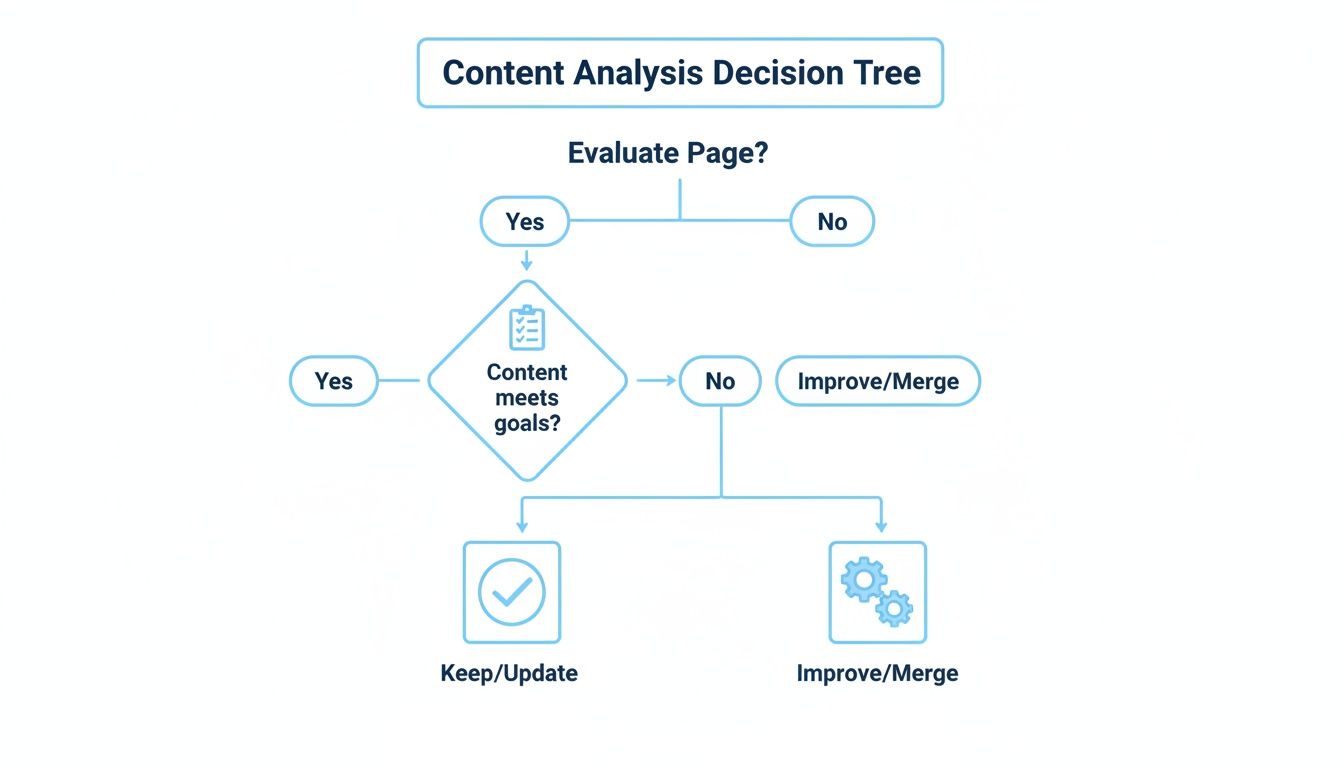
This graphic boils a potentially complex choice down to a straightforward process. You evaluate the page, see if it’s meeting objectives, and then decide what to do next. It’s a practical, repeatable way to sort through your entire content library.
Based on what you’ve uncovered, every page in your inventory is going to land in one of four buckets. This framework takes the guesswork out of the equation and gives you a clear path forward for optimizing your site.
Your four options are simple:
Deciding to Keep a page is the easiest call you'll make. These are your top-performing assets, the content that's actively contributing to your MSP's growth and bringing in new business. They are the bedrock of your online presence.
So, what makes a page a "keeper"?
These pages don’t need a massive overhaul. Your main job here is to protect them. Keep the information fresh, monitor their performance closely, and use them as a template for what success looks like.
This is where you'll find some of your biggest wins. The Improve category is for content that’s almost there. These pages show signs of life, maybe they get decent traffic or rank for a few keywords, but for whatever reason, they just aren't converting.
I see this all the time. Here are a few real-world examples:
Putting in the effort to fix these pages can deliver a serious return. The fix could be as simple as rewriting the copy to be more compelling, adding a strong call-to-action, optimizing for Core Web Vitals, or expanding the content to truly showcase your expertise.
Remember, improving content isn't just about words. It's about meeting modern user expectations. It's surprising, but only 54.6% of websites actually pass Core Web Vitals, which is a huge miss when 60% of global traffic is now mobile. For a deeper dive into content best practices, check out the guidance in our agency's style guide.
Finally, it’s time to deal with the pages that are dragging you down. Consolidation is the perfect strategy when you find several thin, low-traffic blog posts that all cover a similar topic.
For instance, maybe you have three separate, short articles on phishing, ransomware, and malware. Why not combine them into one authoritative "Ultimate Guide to Cybersecurity Threats"? This creates a single, powerful asset that's far more valuable to both users and search engines.
Pruning, on the other hand, is just digital decluttering. This is reserved for content that’s completely outdated, irrelevant, or gets zero traffic and has no valuable backlinks. Think old service offerings you stopped providing years ago or blog posts about tech from 2012. Removing this content (and implementing proper 301 redirects) cleans up your site architecture and helps Google focus its crawling budget on your most important pages.
An SEO content audit report is worthless if it just gathers digital dust on a server. Its real value is unlocked when you translate all that data into concrete actions that actually generate leads for your MSP. This is where the analysis ends and execution begins.
The entire process, from creating an inventory to running technical checks, gives you an incredibly solid foundation. Now, it's time to build on it. Don't let the sheer volume of recommendations paralyze you. The secret is to build momentum by tackling the highest-impact tasks first, the quick wins and low-hanging fruit you've already identified.
To keep things from getting overwhelming, let's focus on a handful of immediate actions. This isn’t about boiling the ocean and doing everything at once. It’s about kicking off a cycle of continuous improvement that will pay dividends for months and years to come.
I recommend starting with these three things:
A content audit isn't a one-and-done project. Think of it as the beginning of a smarter, more deliberate way to manage your MSP's online presence: your strategic playbook for turning the website into a predictable growth engine.
Most MSP owners are brilliant at understanding complex systems, so the logic behind a thorough audit is usually crystal clear. The real challenge? Finding the time and internal resources to execute the plan while also running a business. Juggling client emergencies, managing techs, and steering the company doesn't leave much room for deep-dive marketing work.
This is where bringing in a partner can be a game-changer. If you get the "why" behind the audit but just don't have the bandwidth for the "how," working with an expert can turn your findings into tangible results. A seasoned partner takes your detailed roadmap and does the heavy lifting, converting those insights into a reliable stream of qualified leads.
If you're ready to see how a strategic SEO plan gets put into action, you can learn more about our specialized SEO services for MSPs.
Even with a detailed process laid out, it's perfectly normal to have a few lingering questions about how an SEO content audit fits into your bigger picture. It’s an intensive process, after all. Let’s clear up some of the most common things we hear from MSP owners.
Think of this as the final check before you commit to turning your website from a digital brochure into a powerful lead-generation engine.
For a full, deep-dive audit, you'll want to do this annually. This gives you a solid benchmark to measure growth against and helps you adapt to any major algorithm updates or shifts in your own business goals.
But you can't just set it and forget it for 12 months. We always recommend a lighter quarterly health check. This lets you keep an eye on performance, spot any new technical glitches that pop up, and make sure your competitors aren't sneaking up on you.
Pro Tip: If you've just gone through a website redesign, launched a new service, or seen a sudden, scary drop in traffic or leads, don't wait. An immediate audit is your best bet to figure out what's wrong before it really hurts your pipeline.
Hands down, the most common mistake is creating content just for the sake of it, with no real strategy behind it. Too many MSPs get stuck publishing generic IT blog posts that don't connect with the actual business problems their ideal clients are trying to solve. An audit is the perfect way to fix this.
It helps you stop writing another "what is a firewall" post and start creating content that attracts high-value leads. For example, instead of the generic, an audit might uncover opportunities like these:
This kind of strategic shift makes every piece of content you create work harder to bring in qualified leads.
You can absolutely handle a basic audit on your own. Getting comfortable with free tools like Google Search Console and Google Analytics is a fantastic way to find some low-hanging fruit and get a general sense of your site's performance.
That said, bringing in a specialized agency gives you access to advanced tools, years of hands-on experience, and a much-needed objective viewpoint. An expert can spot complex technical problems you might miss and build a strategic roadmap that’s laser-focused on your growth goals. For MSPs who are serious about scaling, partnering with a specialist almost always yields a much higher and faster ROI.
An SEO content audit isn't just a technical exercise; it's the data-driven roadmap your MSP needs to build a predictable pipeline of new business. At MSP SEO Agency, we specialize in turning these audits into action plans that deliver measurable growth.
Ready to stop guessing and start growing? Schedule your free consultation with us today.
Improving your SEO content is one of the highest-leverage activities in any MSP SEO strategy because it directly influences both rankings and conversion rates. The top features of excellent MSP SEO content include clear alignment with search intent, deep technical accuracy, and strategic keyword placement that feels natural to readers. An MSP SEO agency with content expertise understands how to audit existing pages, identify gaps in topical coverage, and create new content that targets the MSP SEO opportunities competitors are missing. When content improvement is treated as an ongoing component of your MSP SEO services alongside technical optimization and local SEO for MSP targeting, the cumulative effect on organic visibility and lead quality is significant.
See how targeted SEO delivers measurable impact for managed service providers. Explore our proven strategies and real-world outcomes.